
Boundless Black 2 emulator setup
Which DS emulator to use, the four settings worth touching, and how to tell an emulator problem from a bad patch before you spend an evening re-downloading files.
Last checked: November 28, 2026
Boundless Black 2 is a Nintendo DS game at heart, so it runs wherever a DS emulator runs well. Two emulators handle it on desktop, melonDS and DeSmuME. On Android, melonDS has an official build. A flashcart on real hardware works too, if you already own one.
The part that trips people up is not which emulator, it is the order of operations. Set the emulator up with a vanilla Black 2 file first. If vanilla boots, your emulator is fine and any later problem belongs to the patch. If vanilla does not boot, no patch will fix that.
melonDS (desktop and Android)
melonDS is the better default for this generation: newer, faster, and closer to how the hardware behaves. Install it, point it at your ROM folder, then check these before loading anything:
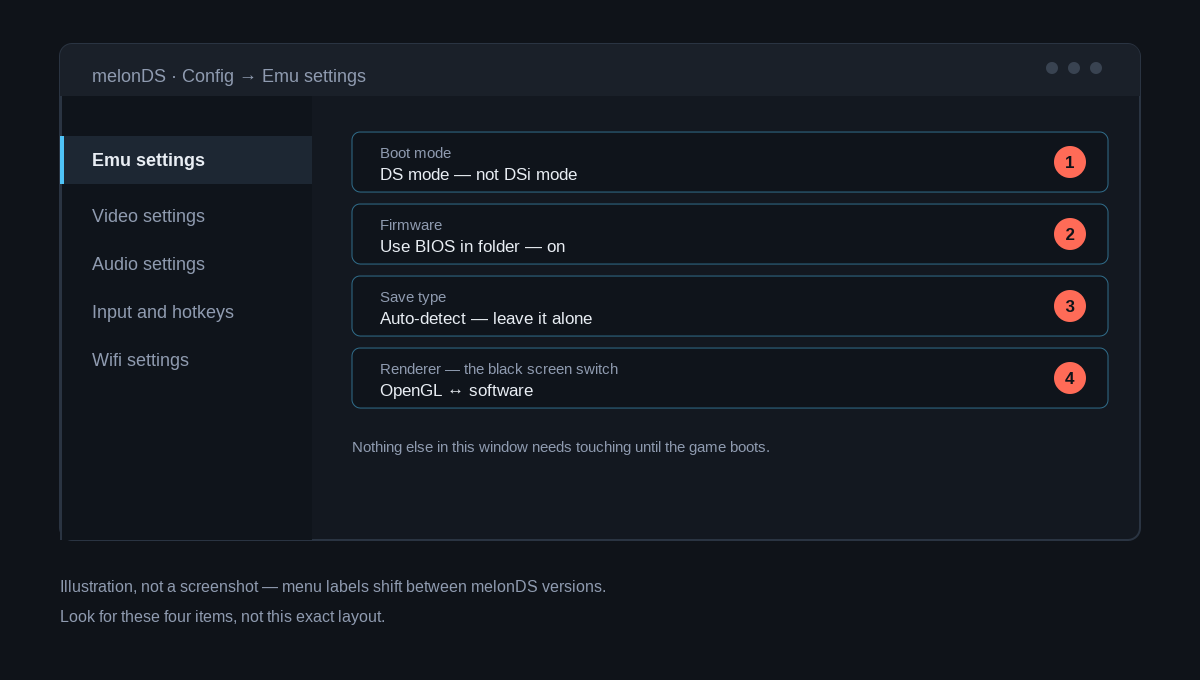
- BIOS and firmware files. melonDS works best with the DS BIOS and firmware files in its folder. Without them, some titles boot but misbehave in ways that look like a broken ROM.
- DS mode, not DSi mode. These are DS-era games. If a title boots to a black screen, check that you are not forcing DSi behaviour.
- Save type set to auto-detect, unless you have a reason to override it. A wrong save type usually shows up as a save that silently fails rather than a crash.
- Renderer. Switch between OpenGL and software rendering if you get a black or garbled screen. This is the fastest fix to try and it costs nothing.
DeSmuME (desktop)
DeSmuME is the older, more forgiving option, and it is what most old Black 2 guides assumed you were using. Load the ROM from File → Open ROM, then:
- Save type: auto. If saving does not stick, set the save type manually to the one your patched file expects.
- Enable the dynamic recompiler for speed. If a game crashes on boot with it on, turn it off once to see whether that is the cause.
- Frameskip is for older machines. If audio stutters but the game runs, turn frameskip up before you assume the patch is broken.
Android and real hardware
On Android, use the official melonDS build rather than a repackaged emulator from an app bundle site. The same rules apply: BIOS files in place, auto save type, switch the renderer if the screen stays black. Performance depends on the phone; a mid-range device handles DS games at full speed with the default settings.
On real hardware, a DS flashcart needs the patched file to match your cart's requirements, and some carts need their own firmware update before they will boot a patched game. If you are going that route, test with a vanilla Black 2 file first for the same reason as above.
When it boots, but not right
Three symptoms and what they usually mean:
| What you see | What it usually is |
|---|---|
| Black screen after the title, emulator still running | Renderer or video setting, not the patch. Toggle OpenGL / software first. |
| "This file is not a valid ROM" or it refuses to load | The patched output was written over the original, or the patch never applied cleanly. |
| Boots but freezes in the first battle | Outdated emulator build or a save type conflict. Update the emulator before re-patching. |
Anything that looks like a checksum or region error is not an emulator problem at all. That is the patch refusing your original file, and the fix is on the install page, not here. The not working page sorts the two cases apart in detail.
Settings we do not recommend changing
Frame hacks, texture packs and "max performance" prefabs cause more false alarms on brand new hacks than they solve. Run the game vanilla for the first hour, confirm the title screen and the first battle, and only then start tuning. If a setting breaks the game, you want to know that it was the setting.
FAQ
Emulator questions
What is the best emulator for Boundless Black 2?
melonDS is the better default on desktop and has an official Android build. DeSmuME is a fine fallback if melonDS gives you trouble. Both run DS games; neither needs the game to be a specific format beyond a standard .nds file.
Do I need BIOS files to run it?
melonDS runs best with the DS BIOS and firmware files in its folder. Without them some games boot but misbehave in ways that look like a broken ROM, which makes troubleshooting much harder than just adding the files.
Why does the game show a black screen?
Almost always a video or renderer setting, not the patch. Switch between OpenGL and software rendering, confirm you are in DS mode rather than DSi mode, and check that the file you loaded is the patched output rather than the original.
Can I play it on my phone?
Yes. Use the official melonDS Android build, put the BIOS files in place, keep the save type on auto, and switch the renderer if the screen stays black. A mid-range phone runs DS games at full speed with default settings.