How to patch Boundless Black 2
The full xdelta flow on Windows and in the browser, the three checks that prevent every common failure, and how to confirm the patched file is real before you load it.
Last checked: November 29, 2026
There are two patching tools the release points at, and both do the same job: one runs in your browser, one runs on Windows. Pick one, work on a copy, never overwrite your original.
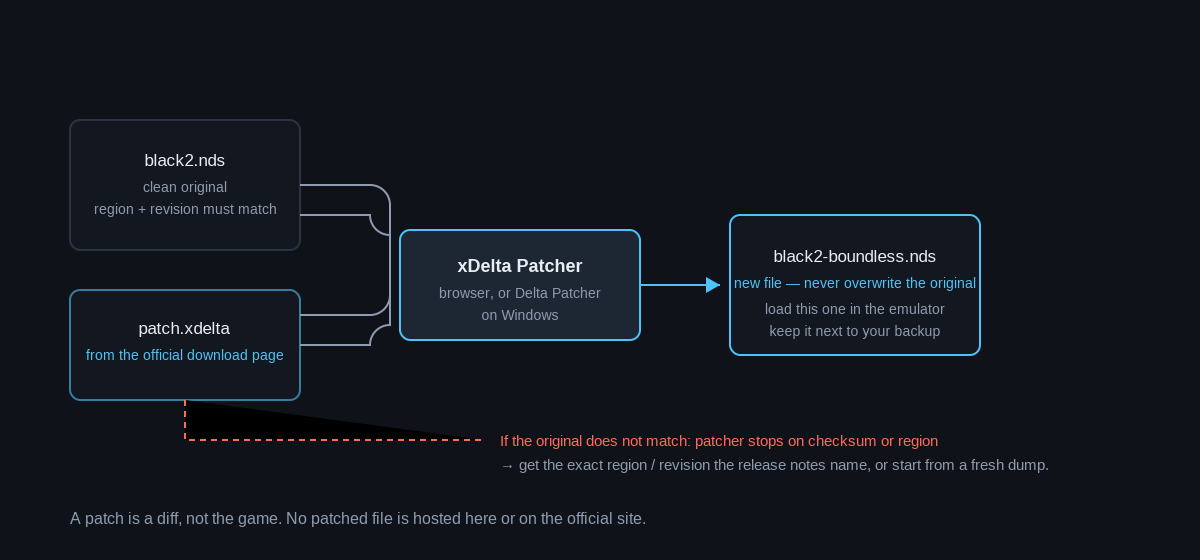
If the patch is not public yet, stop here and check the patch status page first. Nothing on this page will help until the patch file exists.
Before you touch anything
Three checks, two minutes, and they prevent almost every failure:
- Your original file is clean. Not previously patched, not a randomizer output, not something someone sent you in a chat. If you are not sure, use a copy you trust.
- You know your region and revision. Compare against the release notes on the official download page. Region and revision are the first thing a patch checks.
- You have a backup. Copy your clean original into a folder you will not touch, and patch a second copy of it.
Option 1: patch in the browser
Use the official download page for the patch and release notes. For community setup reports or questions, visit r/PkmnBoundlessBlack2.
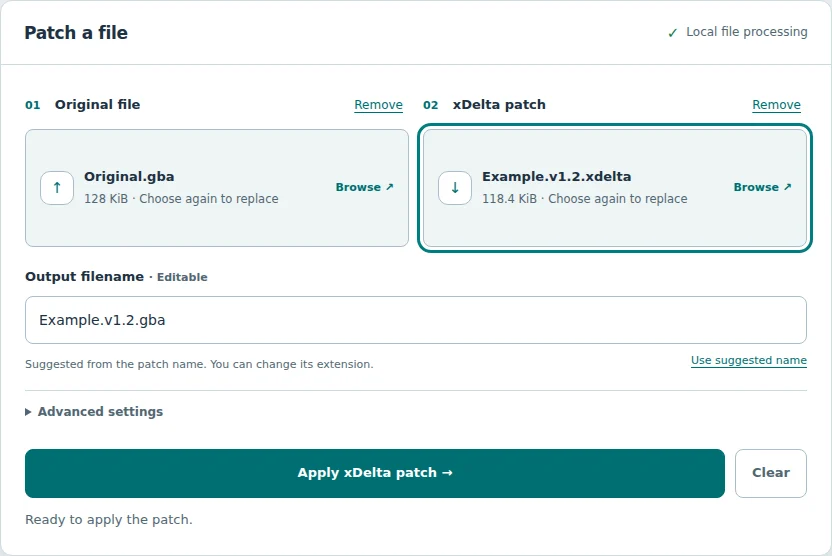
The browser-based xDelta Patcher needs no install. Open it, then:
- Select your clean original Black 2 file as the source.
- Select the .xdelta patch you downloaded from the official release.
- Choose an output filename that is clearly different, something like
BoundlessBlack2.nds. - Apply the patch, then download the output file to your device.
- Keep both files. The output is what you play; the original is what you patch again if something goes wrong.
The patcher processes files in your browser. Large files can take longer on a phone.
Patching on iPhone or Android
If the release uses .xdelta, open xDelta Patcher in Safari on iPhone or Chrome on Android. Select a working copy of your clean Black 2 file and the official patch, then save the result as a new .nds file. On iPhone, find it in Downloads in the Files app and import it into your DS emulator. On Android, move it to the ROM folder you open in melonDS. If a large file stalls or the browser cannot save the result, patch on a computer and copy the finished .nds file to your phone.
Option 2: patch on Windows with Delta Patcher
Delta Patcher is the desktop equivalent:
- Open Delta Patcher and point Original file at your clean Black 2 copy.
- Point XDelta patch at the
.xdeltafile from the release. - Set the output path to a new filename. Do not use the same path as the original.
- Leave checksum verification on and click Apply patch.
- Wait for it to finish, then confirm the output file exists and is roughly the same size as the original.
If it offers to back up the original, let it. If it reports a checksum or patch-apply error, do not retry with a different tool; the problem is the source file, not the tool.
How to tell it worked
A successful patch gives you a new .nds file. There is no partial success where the game boots and is half-patched, so the real test is loading it:
- Open the output file in your emulator, not the original.
- You should see the hack's own title screen, not vanilla Black 2.
- Start a new save. Do not load an old vanilla save into the patched game: saves are tied to the game they came from, and a mismatched save is a crash waiting to happen.
If the title screen is vanilla, you loaded the original file. If the emulator refuses the file, the output was written over the original or the patch never applied. If it boots but the screen stays black, that is an emulator problem and the emulator page is the right next read.
Errors, in plain language
| Message you see | What it means | What to do |
|---|---|---|
| Checksum mismatch / source file mismatch | The patch was built for a different file than yours | Compare region and revision against the release notes, use a fresh clean copy |
| Patch is not a valid xdelta file | The download is incomplete or the file is actually something else | Re-download from the official host, do not rename extensions by hand |
| Output file is 0 bytes, or the tool closes without a file | Output path permission or disk space | Write to your Desktop, not inside a synced or protected folder |
| Tool applies it, but the game will not boot | Usually the emulator, occasionally a corrupted download | Try vanilla first, then the patched file; re-download only as the last step |
Everything that is not on this list lands on the not working page, which splits patch problems from emulator problems in more detail.
FAQ
Install questions
What tool do I need to patch Boundless Black 2?
If the release ships as an xdelta patch, either the browser-based xDelta Patcher or Delta Patcher on Windows will do it. Both read the same .xdelta file and produce a patched .nds output.
Can I patch on a phone?
If the release uses .xdelta, you can try the browser patcher in Safari on iPhone or Chrome on Android. Save a separate .nds file and import it into your DS emulator. If the browser struggles with a large file, patch on a computer and copy the result.
Do I have to keep the original file after patching?
Yes. Keep it. If the patch is updated, or you need to start over, you patch from a clean original. A file that has already been patched cannot be patched again.
Can I use my old Black 2 save file?
Do not load a vanilla save into the patched game. Start a new save, and keep your old save untouched in case you want to go back to the original game.